Streaming a terminal to the browser.
In this example, we use Vim as a back end for ScaleSocket. We stream the TUI to the browser using Xterm.js and websockets. The result is that multiple users can interact with the same Vim instance using the browser.
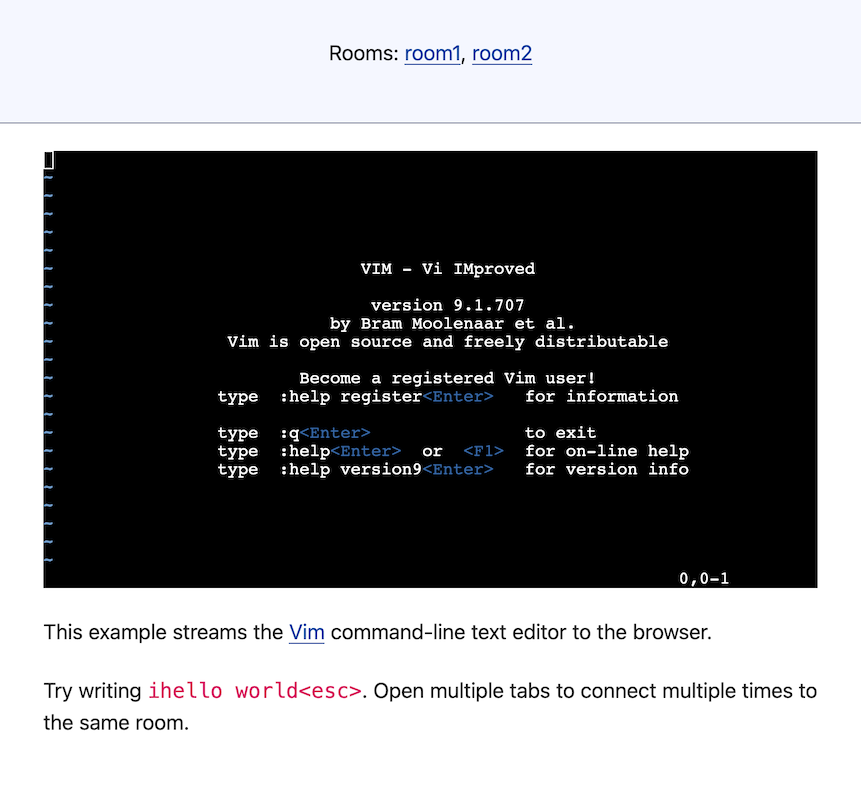
Running the example
Prerequisites:
You can get the source code and run this example with:
git clone git@github.com:scalesocket/scalesocket.git
cd scalesocket/examples
docker compose up --build terminal
open http://localhost:9000/
Architecture overview
This example demonstrates streaming a TUI application to the browser:
- Vim – the text editor running as a back end process
- Xterm.js frontend – renders the terminal in the browser
- ScaleSocket – bridges websockets to stdin/stdout in binary mode
Front end
We'll create index.html with the following contents:
<!doctype html>
<html>
<head>
<title>Terminal streaming example using ScaleSocket</title>
<meta charset="utf-8" />
<link rel="stylesheet" href="https://cdn.simplecss.org/simple.min.css" />
<script src="https://cdn.jsdelivr.net/npm/xterm@5.3.0/lib/xterm.min.js"></script>
<script src="https://cdn.jsdelivr.net/npm/@xterm/addon-attach@0.12.0/lib/addon-attach.min.js "></script>
<link href="https://cdn.jsdelivr.net/npm/xterm@5.3.0/css/xterm.min.css" rel="stylesheet">
<style>
html, body { width: 100vw; overflow: hidden; }
</style>
</head>
<body>
<header>
<p>
Rooms: <a href="?room=room1">room1</a>, <a href="?room=room2">room2</a>
</p>
</header>
<main>
<div id="terminal"></div>
<p>
This example streams the <a href="https://en.wikipedia.org/wiki/Vim_(text_editor)">Vim</a>
command-line text editor to the browser.
</p>
<p>
Try writing <code>ihello world<esc></code>.
Open multiple tabs to connect multiple times to the same room.
</p>
</main>
<script>
const $ = id => document.getElementById(id);
const room = new URLSearchParams(location.search).get("room") || 'room1';
const protocol = location.protocol === "https:" ? "wss" : "ws"
const ws = new WebSocket(`${protocol}://${location.host}/${room}`);
const term = new Terminal();
term.loadAddon(new AttachAddon.AttachAddon(ws));
term.open(document.getElementById('terminal'));
ws.onopen = () => {
term.focus();
// ask `vim` to redraw the screen
ws.send("\x1b:redraw!\n");
}
</script>
</body>
</html>Back end
We'll use the vim binary as our back end.
Additionally, we'll wrap vim with unbuffer to expose a pseudo-terminal for improved compatibility.
We'll use a Dockerfile with the following contents:
# syntax=docker/dockerfile:1.2
FROM scalesocket/scalesocket:latest
RUN apk add --no-cache\
    --repository http://dl-cdn.alpinelinux.org/alpine/edge/main\
    --repository http://dl-cdn.alpinelinux.org/alpine/edge/testing\
    expect vim

COPY index.html /var/www/public/index.html

CMD scalesocket\
    --binary\
    --staticdir /var/www/public/\
    unbuffer -- -p vim
The scalesocket/scalesocket:latest docker image is based on Alpine linux.
We use apk to install unbuffer (included in expect) and vim.
We start vim using scalesocket in binary mode.
Scalesocket will also serve the static HTML.
To clone and run the complete example, do:
git clone git@github.com:scalesocket/scalesocket.git
cd scalesocket/examples
docker compose up --build terminal
Then open http://localhost:9000/ in your browser.
You should see a working terminal interface running Vim.
Try using vim and opening multiple browser tabs to connect to the same room multiple times.
How does it work?
The HTML frontend connects to the ScaleSocket server at ws://localhost:9000/room1 using websockets.
The back end spins up a new vim process for the room.
The frontend uses Xterm.js and xterm-addon-attach to hook up a in-browser terminal to the websocket.
When the frontend sends a key press, ScaleSocket passes it directly to the stdin of vim.
When the vim TUI redraws the screen, the stdout is sent to all connected clients.
Next.
- Real-time collaborative whiteboard
- Simple websocket chat using cat
- Usage
- Advanced usage
- Command-line reference